
In this series of articles on local model serving, we learned about using Ollama, Docker Model Runner, and LMStudio. At Build 2025, Microsoft announced Foundry Local. This is specifically designed for running AI models on resource-constrained devices, making it ideal for local AI inference on edge devices. Foundry Local features model management and deployment via a command-line interface, and offers an OpenAI API-compatible RESTful API. It also supports Python, C#, Rust, and JavaScript SDKs for local AI model management.
Foundry Local Architecture
Before we delve into the details of using Foundry Local for AI inference, let’s understand its architecture and components.
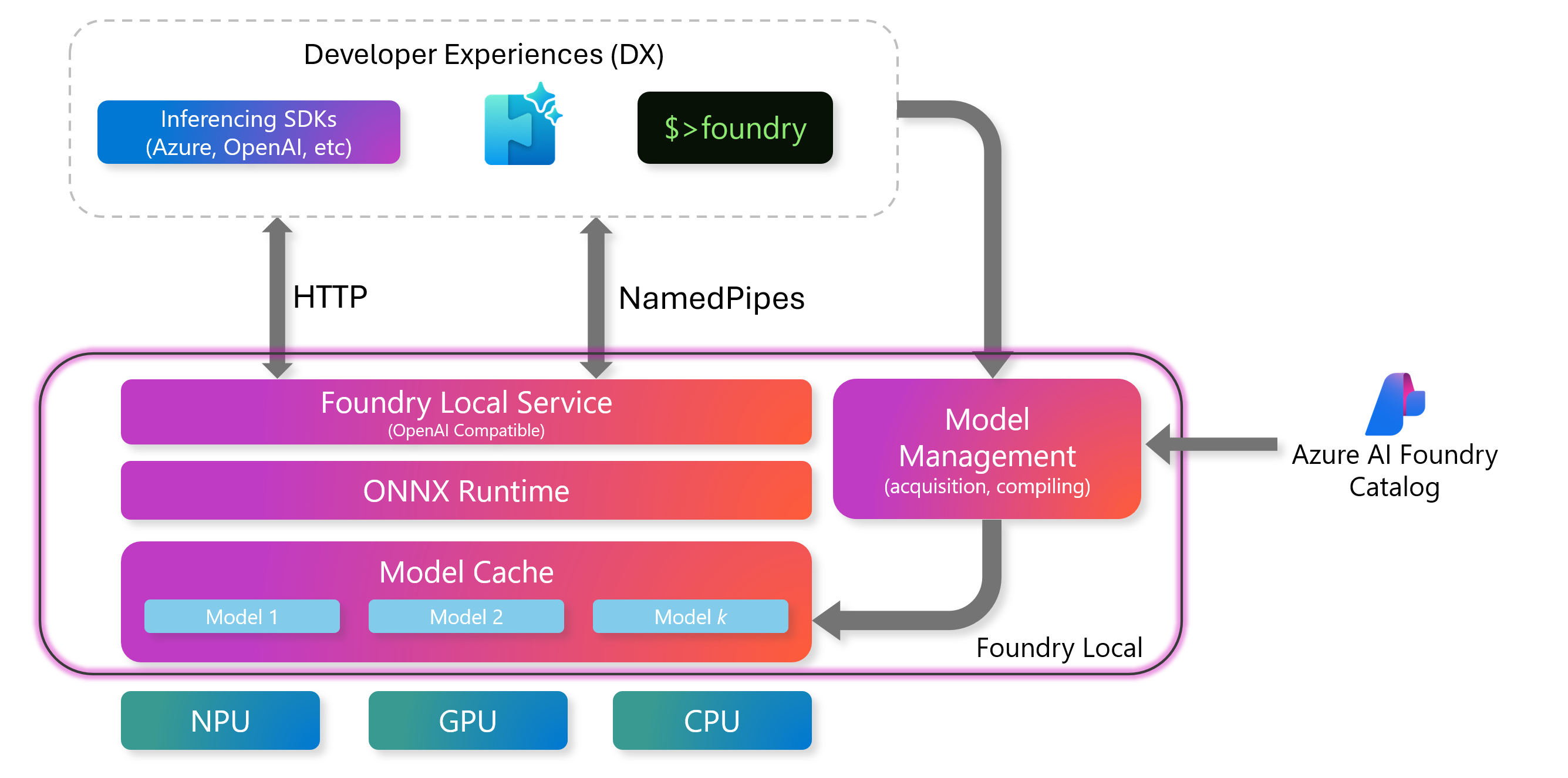
The model management component in this architecture is responsible for managing the model lifecycle, compiling models, and maintaining the model cache. The model lifecycle includes downloading, loading, running, unloading, and deleting models from the local cache.
The ONNX runtime is the key component of this architecture. ONNX is a cross-platform ML model accelerator that supports models from PyTorch, JAX, and other frameworks. This runtime is responsible for executing the models and supports multiple hardware providers and device types.
The Foundry Local service is the OpenAI-compatible REST API interface for working with the inference engine. This REST API endpoint can be used with any programming language to interact with the inference endpoint. This service also provides the REST interface for model management.
With this brief overview of the Foundry Local architecture, let us now dive into the how!
Basics
Foundry Local service needs to be installed on the local Windows or macOS system. On Windows, you can use winget to install Foundry Local.
| |
Once the service is installed, you can use the foundry service status command to check its status.
| |
Foundry Local chooses a random port every time the service restarts. To avoid that, you can use the following command to configure a fixed port number.
| |
foundry cache location command returns the model cache directory path.
| |
If you want to move the model cache to a different path, you can use the foundry service set --cachedir command and supply the new directory path as the argument.
To view the existing service configuration, run the foundry service set --show command.
| |
To list all models available to run locally, use foundry model list command. This command lists all models available in the Foundry catalog
The foundry model run command runs a model for inference. This command starts an interactive session. If the model is not present in the local model cache, it gets downloaded. If you want to download the model but not run it immediately, you can use foundry model download command.
| |
The foundry model load command loads the model from the cache for inference.
| |
By default, a model loaded this way lives for only 600 seconds. To change that, you can specify the --ttl optional parameter. You can retrieve a list of all models using the foundry service ps command.
| |
Inference API
The real goal of local AI inference is to develop and use AI applications. We need to use the inference API for this. Loading a model to the foundry service enables the inference interface to the model.
Let us first list the loaded models using the REST API.
| |
The /v1/chat/completions endpoint can be used to create a chat completion.
| |
We have got the inference working with the local model. This is a simple PowerShell command to invoke the chat completion API. You can, of course, use any OpenAI-compatible SDK in your favorite language to perform the same inference action.
| |
This is a quick overview of how Foundry Local can help with local AI inference on resource-constrained devices. In the later parts of this series, we will learn more about using Foundry Local models for different use cases.
Last updated: 18th November 2025