I have been following the Microsoft ecosystem for agent and agentic workflow development and have evaluated frameworks such as AutoGen and Semantic Kernel. In the past, I have written briefly about AutoGen. I used Semantic Kernel, along with Azure AI Foundry, to experiment with a few enterprise-ready agentic scenarios. Both frameworks are useful in their own ways, and Semantic Kernel, with its enterprise-deployment readiness, became the go-to framework for many. Microsoft announced plans to converge these frameworks into what it calls the Microsoft Agent Framework, which brings together the best parts of AutoGen and Semantic Kernel.
Microsoft Agent Framework supports enterprise integrations using Microsoft 365 Agents SDK and the enterprise-grade agent service integrations with Microsoft Foundry (Azure AI Foundry is renamed to Microsoft Foundry). Microsoft Agent Framework is built with interoperability at its core, which means it has built-in support for open standards such as the Model Context Protocol (MCP) for data and tool access and Agent-to-Agent (A2A) for inter-agent communication.
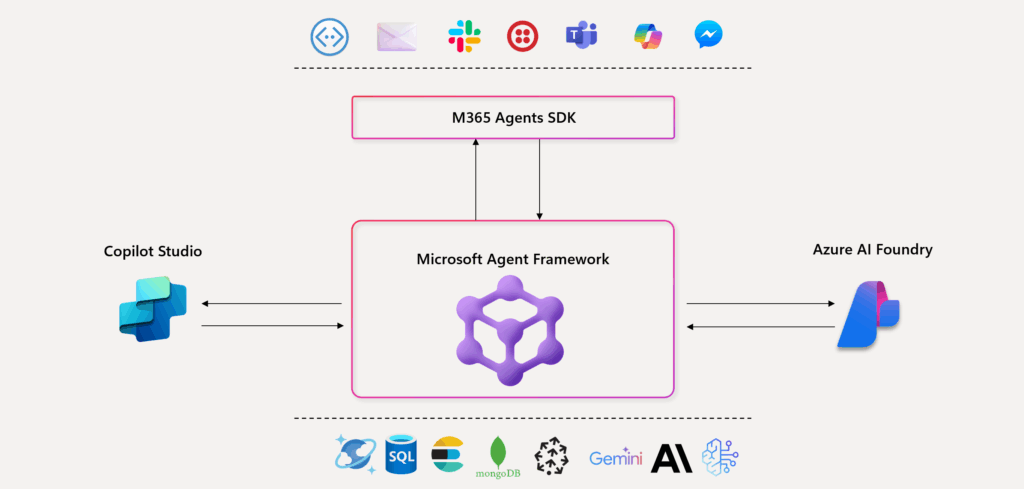
Figure 1: Agent Framework (Source: Microsoft)
Microsoft Agent Framework supports Agent and Workflow orchestration. This enables LLM-driven reasoning and decision-making as well as business-logic driven deterministic agentic workflows. As a developer, you can choose what makes more sense for your use case. Agents and workflows are two primary capability categories that this framework offers.
Agents use LLMs as their brains, tools for accessing external APIs, and to perform actions. Because of their probabilistic nature, agents are best suited to scenarios where the input task is unstructured and cannot be easily defined in advance. Microsoft Agent Framework supports different types of agents for different use cases. The Azure AI Foundry Agents are used to create agents that use the Foundry Agent service. In addition, it supports Anthropic agents, Azure OpenAI, and OpenAI chat and response agents.
Here is a quick example of an Azure AI Foundry agent.
| |
Workflows are graph structures that connect multiple agents to perform complex, multi-step tasks. A workflow is well-suited to a predefined sequence of operations and may include multiple agents, external integrations, and human interactions. By defining the flow of work, a developer can control the execution path, resulting in more deterministic behavior. Microsoft Agent Framework derives its workflow orchestration capabilities from AutoGen and therefore supports sequential, concurrent (parallel), handoff (control transfer), group chat (collaborative conversations), and magentic (manager-coordinated) workflows.
Here is a quick example of a concurrent workflow.
| |
In this series of articles, we will learn how to create agents and workflows using the Microsoft Agent Framework. We will start by diving deep into Agents, then move on to exploring workflows in depth.
Last updated: 6th December 2025