Every other week, we see a new framework claiming to simplify AI agent development. Thanks to the growing interest in agentic AI. Earlier this year, Google released its framework for developing agents, which it called the Agent Development Kit (ADK).
Bo Yang, tech lead of the ADK project, wrote about how ADK was born and described how 100 lines of code became the most sought-after agent development framework. It is fascinating to read how ADK evolved into what it is today.
So, what is ADK? What makes it special when there are a million other frameworks out there? In this series of posts, we will explore answers to these questions.
Introduction
Google ADK provides an open foundation for simplifying agent and agentic workflow development. With ADK, you can use not just Google’s Gemini models but models from any provider, making model agnostic. The agents and workflows developed using ADK are deployment-agnostic and can run on your local machine, in Google Cloud, or in your own data center. True to its developers’ intentions, ADK supports interoperability with agents built in other frameworks via the Agent-to-Agent (A2A) protocol. In my work with various agent development frameworks, I found ADK to be very easy to get started with while providing powerful constructs for building enterprise-ready agents and agentic workflows. With ADK, you can create agents in Python, Go, and Java programming languages. All examples in this series of articles on ADK will be written in Python.
Let us explore further using code.
To get started with creating agents, all you need is the google-adk package.
 1
 2
 3
 4
 5
 6
 7
 8
 9
10
11
12
13
14
15
16
17
18
19
C:\> pip install google-adk
C:\> adk --help
Usage: adk [OPTIONS] COMMAND [ARGS]...

  Agent Development Kit CLI tools.

Options:
  --version  Show the version and exit.
  --help     Show this message and exit.

Commands:
  api_server   Starts a FastAPI server for agents.
  conformance  Conformance testing tools for ADK.
  create       Creates a new app in the current folder with prepopulated agent template.
  deploy       Deploys agent to hosted environments.
  eval         Evaluates an agent given the eval sets.
  eval_set     Manage Eval Sets.
  run          Runs an interactive CLI for a certain agent.
  web          Starts a FastAPI server with Web UI for agents.
The adk command-line provides the necessary capabilities to create, run, deploy, and evaluate agents. Using the adk web command, you can converse with the agents and debug their execution. Let us start with creating an agent using the adk create command. When you run this command, you will be prompted for a model to use, a backend for the agent deployment and services, and an API key if you have chosen the Google Gemini model.
 1
 2
 3
 4
 5
 6
 7
 8
 9
10
11
12
13
14
15
16
17
C:\> adk create code_agent
Choose a model for the root agent:
1. gemini-2.5-flash
2. Other models (fill later)Choose model (1, 2): 11. Google AI
2. Vertex AI
Choose a backend (1, 2): 1Don't have API Key? Create one in AI Studio: https://aistudio.google.com/apikey
Enter Google API key: YOUR_API_KEY
Agent created in C:\GitHub\google-adk-101\code_agent:
- .env
- __init__.py
- agent.py
As seen in the output, this command generates the necessary scaffolding. The .env file contains environment variables, including GOOGLE_API_KEY for Google Gemini models. The __init__.py file serves as the agent entry point and imports the agent defined in agent.py. The agent.py contains the agent definition. Let us explore this further.
1
2
3
4
5
6
7
8
fromgoogle.adk.agents.llm_agentimport Agent
root_agent = Agent(
model='gemini-2.5-flash',
name='root_agent',
description='A helpful assistant for user questions.',
instruction='Answer user questions to the best of your knowledge',
)
Google ADK supports multiple agent types. The one we created is an LlmAgent. This category of agents uses an LLM as the core reasoning engine and is non-deterministic. In the preceding code, you can replace Agent with LlmAgent as both refer to the LLM Agent implementation. We will look at other types of agents later in this series.
In the agent definition above, the model identifies the LLM agent to use for reasoning, and the instruction specifies the agent’s behavior. This scaffold is sufficient to try running this agent.
 1
 2
 3
 4
 5
 6
 7
 8
 9
10
11
12
13
14
C:\> adk run .\code_agent\
....
[user]: Hello, how can you help?
[root_agent]: Hello! I'm here to help answer your questions and provide information to the best of my knowledge.

Here are some examples of what I can do:

*   **Answer questions on a wide range of topics:** History, science, technology, culture, current events, and more.
*   **Explain concepts:** Describe how things work, define terms, or break down complex ideas.
*   **Provide summaries:** Give you a concise overview of a topic or document.
*   **Help with creative tasks:** Brainstorm ideas, write short pieces of text, or suggest options.
*   **Give recommendations:** Suggest books, movies, places, or tools based on your interests.

Just tell me what you need, and I'll do my best to assist you!
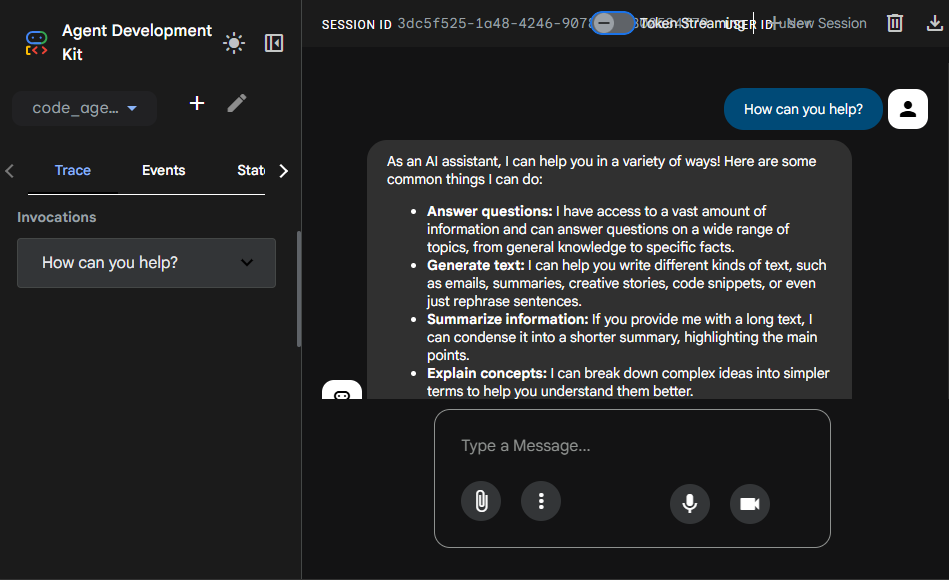
To open the dev-ui web interface, run the adk web command.
The web interface provided by ADK is a great resource for debugging agent conversations and interactions with other agents and tools.
ADK provides a few built-in tools that we can use with our agents. The following example shows the built-in google-search tool for grounding LLMs with Google search results.
 1
 2
 3
 4
 5
 6
 7
 8
 9
10
11
12
13
fromgoogle.adk.agents.llm_agentimport Agent
fromgoogle.adk.toolsimport google_search
root_agent = Agent(
model='gemini-2.5-flash',
name='weather_agent',
description='Weather agent that can get weather information for any location.',
instruction='You are a weather agent that can get weather information for any location. \
Respond in the following format: {"location": "city","temperature": "temperature","condition": "condition"}',
tools=[
google_search,
],
)
When you run this agent using adk run, you will be presented with a conversational prompt.
1
2
3
4
5
C:\> adk run .\weather_agent\ ....
Running agent weather_agent, typeexit to exit.
[user]: What is the weather in Bangalore like?
[weather_agent]: {"location": "Bangalore","temperature": "19 °C","condition": "Partly cloudy"}
fromgoogle.adk.agents.llm_agentimport Agent
importosfromtypingimport Annotated
frompydanticimport Field
defget_weather(
location: Annotated[str, Field(description="The location to get the weather for.")],
) ->str:
importrequestsimportjson api_key = os.getenv("OPEN_WEATHERMAP_API_KEY")
base_url ="http://api.openweathermap.org/data/2.5/weather" complete_url =f"{base_url}?q={location}&appid={api_key}&units=metric" response = requests.get(complete_url)
data = response.json()
if data["cod"] !="404":
main_data = data["main"]
current_temperature = main_data["temp"]
returnf"Temperature: {current_temperature}°C"else:
return"City not found"root_agent = Agent(
model='gemini-2.5-flash',
name='weather_agent',
description='Weather agent that can get weather information for any location.',
instruction='You are a weather agent that can get weather information for any location. \
Respond in the following format: {"location": "city","temperature": "temperature"}',
tools=[
get_weather
],
)
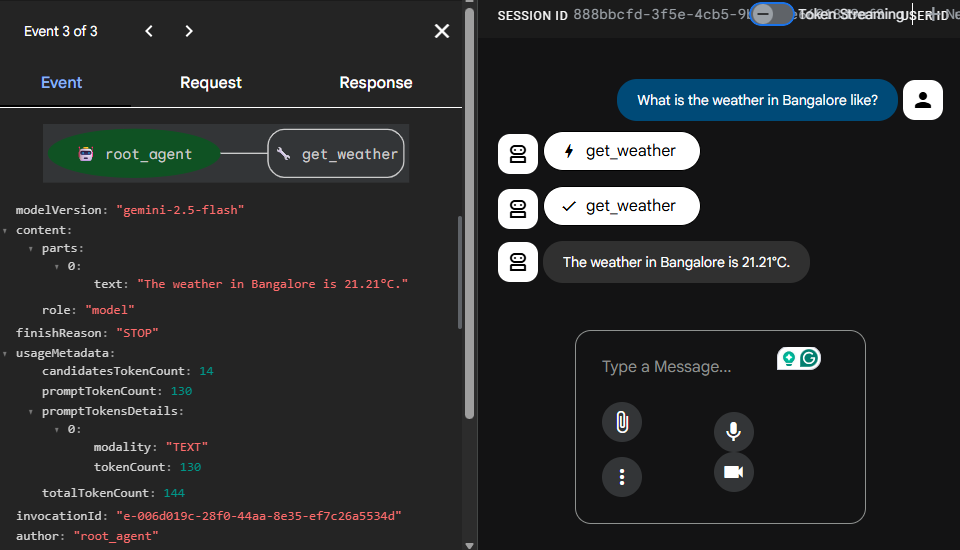
The get_weather function uses the OpenWeatherMap API to retrieve weather data for any location.
1
2
3
4
5
C:\> adk run .\code_agent\
...
Running agent weather_agent, typeexit to exit.
[user]: What is the weather in Bangalore like?
[weather_agent]: {"location": "Bangalore","temperature": "18.66°C"}
Google ADK also supports the Model Context Protocol and can use other agents as tools. We will learn more about this later.
Declarative Configuration
What we have seen so far is an imperative-based approach to implementing agents in ADK. We can also do the same declaratively using a YAML configuration. Let us look at this method.
 1
 2
 3
 4
 5
 6
 7
 8
 9
10
11
12
13
14
15
16
17
C:\> adk create weather_agent --type=config
Choose a model for the root agent:
1. gemini-2.5-flash
2. Other models (fill later)Choose model (1, 2): 11. Google AI
2. Vertex AI
Choose a backend (1, 2): 1Don't have API Key? Create one in AI Studio: https://aistudio.google.com/apikey
Enter Google API key: YOUR_GOOGLE_API_KEY
Agent created in C:\GitHub\google-adk-101\weather_agent:
- .env
- __init__.py
- root_agent.yaml
For creating a YAML-based agent configuration, you need to specify the --type=config optional parameter to the adk create command. This command generates root_agent.yaml instead of agent.py. If you intend to write declarative agents like this, ensure that you have root_agent.yaml always in the agent folder.
1
2
3
4
name:root_agentdescription:A helpful assistant for user questions.instruction:Answer user questions to the best of your knowledgemodel:gemini-2.5-flash
You can add tools to this configuration.
1
2
3
4
5
6
name:root_agentdescription:A helpful assistant for user questions.instruction:Answer user questions to the best of your knowledgemodel:gemini-2.5-flashtools:- name:google_search
This is how built-in tools can be specified. But what about functional tools, such as the get_weather tool we saw earlier? To use function tools within declarative configuration, we need to place them in a Python module and place that module under the agent package. For example, the get_weather function above can be added to the tools.py module.
importosfromtypingimport Annotated
frompydanticimport Field
defget_weather(
location: Annotated[str, Field(description="The location to get the weather for.")],
) ->str:
importrequestsimportjson api_key = os.getenv("OPEN_WEATHERMAP_API_KEY")
base_url ="http://api.openweathermap.org/data/2.5/weather" complete_url =f"{base_url}?q={location}&appid={api_key}&units=metric" response = requests.get(complete_url)
data = response.json()
if data["cod"] !="404":
main_data = data["main"]
current_temperature = main_data["temp"]
returnf"Temperature: {current_temperature}°C"else:
return"City not found"
The folder structure of the agent folder will be as follows:
1
2
3
4
5
6
7
8
C:\> tree /F /A .\weather_agent\
Folder PATH listing
Volume serial number is 987A-295A
C:\WEATHER_AGENT
    .env
    root_agent.yaml
    tools.py
    __init__.py
To reference the tool in the YAML configuration, we must provide the fully qualified path to the function.
1
2
3
4
5
6
name:root_agentdescription:A helpful assistant for user questions.instruction:Answer user questions to the best of your knowledgemodel:gemini-2.5-flashtools:- name:weather_agent.tools.get_weather
With the basics out of the way, let’s dive deep into developing agents and agentic workflows with Google ADK.