Microsoft Foundry (formerly Azure AI Foundry) is a unified system for building intelligent agents. It is a platform that provides models, tools, frameworks, and other aspects such as observability, guardrails, and enterprise-ready governance for creating AI agents. With the Foundry Agent service, developers can develop agents locally and deploy them to different environments seamlessly, leveraging the building blocks provided by Microsoft Foundry. Foundry Agent service provides the runtime that manages conversations, orchestrates tool calls, and integrates with identify and observability systems. As discussed in the previous article, agents use LLMs to reason and make decisions. Agents use tools to perform actions. Agents can participate in workflows or interact with other agents to achieve a bigger goal. This is achieved by treating agents as composable units.

Figure 1: Agents are composable units (Source: Microsoft)
If you are looking to develop production-ready agents for your enterprise needs, the Foundry Agent service provides the necessary building blocks to help you achieve your goals. You can use the Foundry portal or the Foundry SDK to create agents. Before we switch gears to using the Microsoft Agent Framework, let us quickly look at using the Foundry SDK to create agents.
First, let us install the necessary packages.
1
2
| $ pip install azure-ai-projects --pre
$ pip install openai azure-identity python-dotenv
|
You must create a Foundry project, deploy a model for the agent, and set the necessary environment variables.
1
2
| AZURE_AI_FOUNDRY_PROJECT_ENDPOINT=<Foundry-Endpoint>
AZURE_AI_FOUNDRY_MODEL_DEPLOYMENT_NAME="gpt-5-mini"
|
For this example, we will use Azure CLI to authenticate and DefaultAzureCredential to retrieve the authentication token within the Python program. Therefore, ensure that you have logged in using az login command.
The following example demonstrates creating an agent and chatting with the agent.
 1
 2
 3
 4
 5
 6
 7
 8
 9
10
11
12
13
14
15
16
17
18
19
20
21
22
23
24
25
26
27
28
29
30
31
32
33
34
35
36
37
38
39
40
41
42
43
44
| import os
from dotenv import load_dotenv
from azure.identity import DefaultAzureCredential
from azure.ai.projects import AIProjectClient
from azure.ai.projects.models import PromptAgentDefinition
load_dotenv()
agent_name = 'PyTutor'
foundry_endpoint = os.environ["AZURE_AI_FOUNDRY_PROJECT_ENDPOINT"]
foundry_model = os.environ["AZURE_AI_FOUNDRY_MODEL_DEPLOYMENT_NAME"]
instruction = "You are a helpful python programming tutor. Answer questions with code samples and explanation."
project_client = AIProjectClient(
endpoint=foundry_endpoint,
credential=DefaultAzureCredential(),
)
agent = project_client.agents.create_version(
agent_name=agent_name,
definition=PromptAgentDefinition(
model=foundry_model,
instructions=instruction,
),
)
openai_client = project_client.get_openai_client()
conversation = openai_client.conversations.create()
response = openai_client.responses.create(
conversation=conversation.id,
extra_body={"agent": {"name": agent_name, "type": "agent_reference"}},
input="how do I create a python function?",
)
print(f"Response output: {response.output_text}")
response = openai_client.responses.create(
conversation=conversation.id,
extra_body={"agent": {"name": agent_name, "type": "agent_reference"}},
input="Build a python function that returns fibonacci sequence up to n",
)
print(f"Response output: {response.output_text}")
|
AIProjectClient() creates a Foundry client instance, which can be used to create an agent. This is done using agents.create_version() method. This creates an agent in the Foundry.
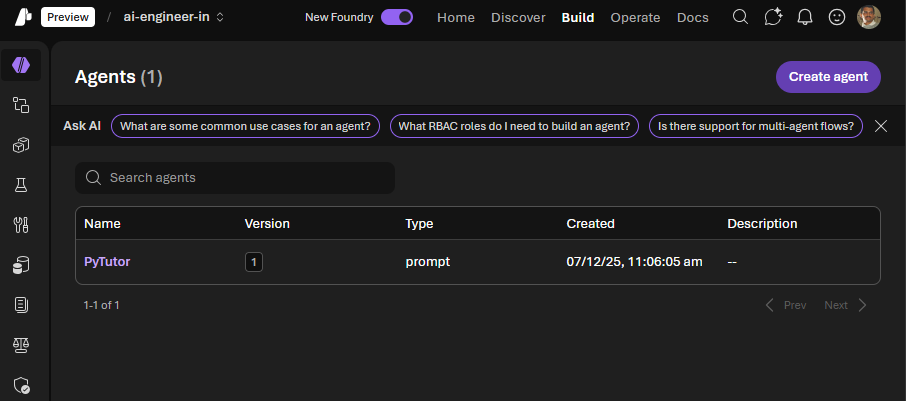
To chat with this agent, we will need an OpenAI client. This is created using the get_openai_client() method. Using this client, we can create a conversation to use with the agent and then chat with the agent. This enables carrying multi-turn conversations.
 1
 2
 3
 4
 5
 6
 7
 8
 9
10
11
12
13
14
15
16
17
18
19
20
21
22
23
24
25
26
27
28
29
30
31
32
33
34
35
36
37
38
39
40
41
42
43
44
45
| C:\> python.exe .\00-microsoft-foundry-agent-create-agent.py
Response output: A Python function is defined with the def keyword, a name, an optional parameter list, and a block of statements. It can optionally return a value with return. Here are concise examples and explanations.
1) Basic function
```python
def greet(name):
"""Return a greeting string for name."""
return f"Hello, {name}!"
print(greet("Alice")) # Hello, Alice!
```
....
If you want, tell me what kind of function you need and I’ll show a tailored example.
Response output: Here are two common interpretations of "Fibonacci up to n" and simple, clear functions for each. Both start the sequence 0, 1, 1, 2, 3, ...
1) "Up to n terms" — return the first n Fibonacci numbers
```python
from typing import List
def fib_n_terms(n: int) -> List[int]:
"""Return a list of the first n Fibonacci numbers (starting with 0).
fib_n_terms(0) -> []
fib_n_terms(1) -> [0]
fib_n_terms(5) -> [0, 1, 1, 2, 3]
"""
if n <= 0:
return []
if n == 1:
return [0]
seq = [0, 1]
while len(seq) < n:
seq.append(seq[-1] + seq[-2])
return seq
# Example
print(fib_n_terms(6)) # [0, 1, 1, 2, 3, 5]
```
....
Notes
- Time complexity for these is O(n) (n = number of terms produced or upper bound on produced terms).
- Use the "n terms" function when the caller wants a fixed-length sequence; use the "up to value" or generator when limited by a maximum value.
- If you prefer the sequence to start at 1, 1 instead of 0, 1, I can show that variant too.
|
Chat with an existing agent
To chat with an existing Foundry agent, we need to obtain an agent instance. This is done using project_client.agents.get(agent_name="PyTutor") method.
 1
 2
 3
 4
 5
 6
 7
 8
 9
10
11
12
13
14
15
16
17
18
19
20
21
22
23
24
25
26
27
| from azure.identity import DefaultAzureCredential
from azure.ai.projects import AIProjectClient
import os
from dotenv import load_dotenv
load_dotenv()
agent_name = 'PyTutor'
foundry_endpoint = os.environ["AZURE_AI_FOUNDRY_PROJECT_ENDPOINT"]
project_client = AIProjectClient(
endpoint=foundry_endpoint,
credential=DefaultAzureCredential(),
)
agent = project_client.agents.get(agent_name=agent_name)
print(f"Retrieved agent: {agent.name}")
openai_client = project_client.get_openai_client()
# Reference the agent to get a response
response = openai_client.responses.create(
input=[{"role": "user", "content": "Tell me what you can help with."}],
extra_body={"agent": {"name": agent.name, "type": "agent_reference"}},
)
print(f"Response output: {response.output_text}")
|
Once we have an agent instance, we can use the OpenAI client to chat with the agent and retrieve a response.
1
2
3
4
5
6
7
| C:\> python.exe .\01-microsoft-foundry-agent-chat-with-existing-agent.py
Retrieved agent: PyTutor
Response output: I’m a Python programming tutor — I can help with pretty much anything related to learning, writing, debugging, and improving Python code. Here’s a quick summary of what I can do and how I’ll help you.
What I can help with
- Basics: syntax, variables, control flow, functions, classes, modules, file I/O.
....
|
As shown earlier, agents created with the Foundry SDK are available in the Foundry Portal. You can customize the agents further using the portal functionality.
Last updated: 7th December 2025